A speed test that ends in a letter grade.
Runs against the Cloudflare edge and grades the connection A+ to F on latency, jitter, packet loss and loaded overhead.
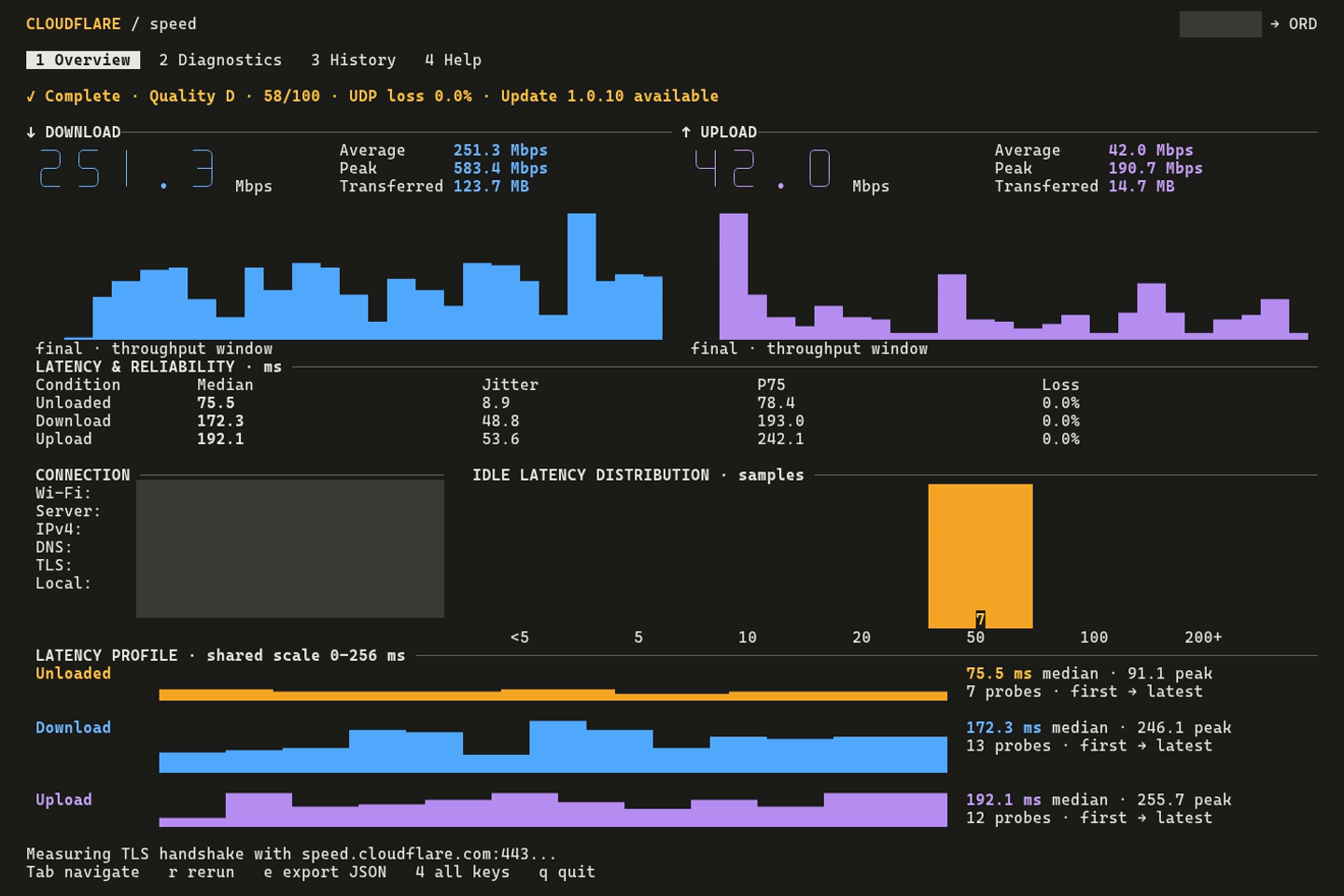
Download and upload phases were shortened to 5 seconds for the recording.cloudflare-speed-tui / overview
Four weighted scores, one letter.
Each input is scored 0 to 100 from fixed bands. The weighted sum maps to a grade. If no loaded latency was measured, the 15 points move to idle latency.
idle latency
- under 10 ms
- 100
- 10 to 19
- 90
- 20 to 49
- 70
- 50 to 99
- 50
- 100 to 199
- 25
- 200 and up
- 0
jitter
- under 1 ms
- 100
- 1 to 3
- 85
- 3 to 10
- 60
- 10 to 20
- 30
- 20 and up
- 0
packet loss
- under 0.001%
- 100
- under 0.1%
- 90
- under 1%
- 70
- under 3%
- 40
- 3% and up
- 0
loaded overhead
- under 10%
- 100
- 10 to 24%
- 80
- 25 to 49%
- 60
- 50 to 99%
- 30
- 100% and up
- 0
The recorded run: idle latency of 75.5 ms scores 50. Loaded download latency of 172.3 ms is 128% over idle, which scores 0. Jitter of 8.9 ms scores 60; zero loss scores 100. The weighted total is 57.5 points, displayed as 58, grade D.
What a run records.
The test starts when the app launches unless you turn that off with --test-on-launch false.
idle latency
Probes before the transfer phases, 2 seconds by default. Reported as a median with quartiles.
download and upload
10 second phases by default, 6 workers. Requests are 10 MB down and 5 MB up unless you change them.
loaded latency
Latency probed during the download and during the upload. The gap from idle becomes the overhead score.
udp packet loss
50 packets by default, set with --udp-packets. Reported as received count, loss percent and round-trip time.
dns and tls
Lookup and handshake times run by default. --skip-diagnostics leaves them out.
ip versions and route
--compare-ip-versions compares IPv4 with IPv6. --traceroute traces the path to the edge, 30 hops at most.
Recorded, not mocked.
The recording couldn’t load. View the original recording.
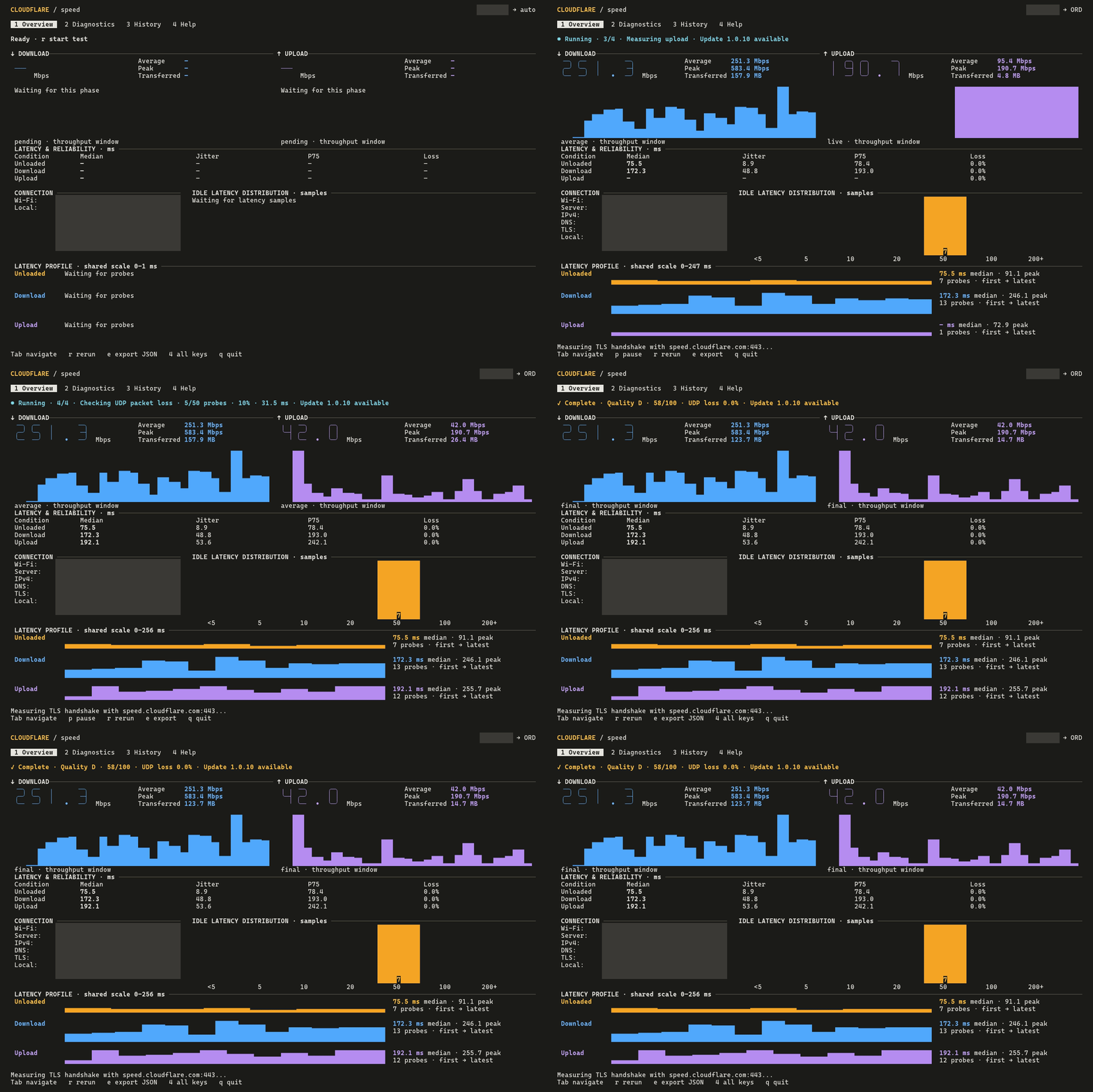
--download-duration 5s --upload-duration 5s --auto-save false.overview
Live throughput, latency and reliability, distribution and a shared-scale latency profile.
diagnostics
The DNS, TLS and route measurements.
history
Saved runs. Saving is on by default.
help
Key bindings for the four tabs.
Interactive, or just the numbers.
json
Prints the result and exits.
cloudflare-speed-tui --json
text
Prints a text summary and exits.
cloudflare-speed-tui --text
silent
Only errors are printed. Meant for cron.
cloudflare-speed-tui --silent
all 29 options
Search all options, or toggle categories to narrow the list.
| flag | what it does | default |
|---|---|---|
| output | ||
| --json | Print JSON result and exit, no TUI | |
| --text | Print text summary and exit, no TUI | |
| --silent | Suppress all output except errors | |
| --export-json <path> | Export results as JSON | |
| --export-csv <path> | Export results as CSV | |
| --auto-save <bool> | Save each run to history | true |
| --comments <text> | Attach a comment to this run | |
| timing | ||
| --download-duration | Download phase length | 10s |
| --upload-duration | Upload phase length | 10s |
| --idle-latency-duration | Idle latency probe length, before the test | 2s |
| --probe-interval-ms | Time between latency probes | 250 |
| --probe-timeout-ms | Probe timeout | 800 |
| --udp-packets | UDP packets sent for the loss measurement | 50 |
| load | ||
| --concurrency | Workers for download and upload | 6 |
| --download-bytes-per-req | Bytes per download request | 10000000 |
| --upload-bytes-per-req | Bytes per upload request | 5000000 |
| network | ||
| --base-url | Speed test service to use | https://speed.cloudflare.com |
| --interface <name> | Bind to a network interface, such as eth0 | |
| --source <ip> | Bind to a source IP address | |
| --proxy <url> | Route traffic through an HTTP, HTTPS or SOCKS5 proxy | |
| --certificate <path> | Custom TLS certificate, PEM or DER | |
| --ipv4-only | Force IPv4 | |
| --ipv6-only | Force IPv6 | |
| diagnostics | ||
| --compare-ip-versions | Compare IPv4 and IPv6 performance | |
| --traceroute | Trace the route to the Cloudflare edge | |
| --traceroute-max-hops | Hop limit for the traceroute | 30 |
| --skip-diagnostics | Skip the default DNS and TLS measurements | |
| launch | ||
| --test-on-launch <bool> | Start a test when the app opens | true |
| --experimental | Reserved for future features | |
No options match. Try another search or restore all categories.
Built from source with cargo.
full build
The interactive TUI and the non-interactive modes.
cargo build --release
headless build
No TUI dependencies. Use --json, --text or --silent.
cargo build --no-default-features